
Introduction
Samsung Game Launcher has become an indispensable tool for many mobile gamers seeking a more seamless and organised gaming experience on their handsets. In a world where mobile gaming is quickly expanding, managing many games, notifications, and device performance can become stressful. Samsung Game Launcher tackles this problem by consolidating all of your games into a single dedicated location, boosting performance and decreasing distractions.
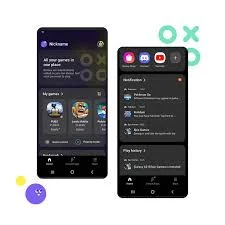
For many users, the Samsung Game Launcher is more than just a gaming platform. It serves as a smart companion, optimising games, tracking gaming time, and offering handy capabilities such as screen recording and performance monitoring. Whether you are a casual player or someone who spends hours exploring mobile games, Samsung Game Launcher improves the whole experience.
What is Samsung Game Launcher?
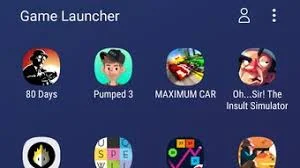
Samsung Game Launcher is an integrated gaming platform found on many Samsung smartphones and tablets. It automatically organises all installed games into a single location, making them easier to search and run. Instead of having to search through your entire app list, users can access their favourite games immediately from a dedicated gaming dashboard.
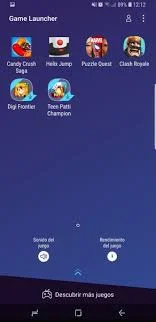
Beyond organisation, the app also includes performance tools designed to improve gameplay. These tools can reduce distractions from notifications, optimise device resources, and offer useful features like game recording or screenshot capture.
Samsung Game Launcher allows users to:
- Organize all games in one place
- Block notifications while playing
- Record gameplay and capture screenshots
- Monitor gaming time and statistics
- Optimize device performance for games
- Discover new trending games
The app is free and comes pre-installed on many Samsung Galaxy devices, making it easily accessible for users who want a better gaming environment.
Why Use Samsung Game Launcher?
Many mobile gamers prefer Samsung Game Launcher because it offers several advantages that improve the overall gaming experience.
Organized Gaming Hub
One of the biggest benefits of Samsung Game Launcher is that it collects all games in one place. Instead of scrolling through multiple pages of apps, users can access their entire game library instantly.
Fewer Distractions
Nothing is more frustrating than receiving notifications while playing an intense game. Game Launcher can block notifications and calls during gameplay so players can focus fully on their game.
Performance Optimization
The app helps manage device resources by adjusting performance settings. This can improve game stability, reduce lag, and extend battery life during longer gaming sessions.
Gameplay Recording
Samsung Game Launcher allows users to record their gameplay or capture screenshots easily. This feature is useful for players who enjoy sharing their gaming moments on social media or with friends.
Gaming Statistics
The app tracks gaming time and usage patterns, helping players understand how much time they spend playing different games.
Key Features of Samsung Game Launcher
Game Organization
Samsung Game Launcher automatically detects installed games and gathers them into one convenient hub. This makes it easier to manage and launch games quickly.
Game Booster Integration
The platform works together with Samsung’s Game Booster tool, which helps optimise performance, monitor device temperature, and manage battery usage.
Do Not Disturb Mode
During gameplay, the launcher can silence notifications, calls, and alerts to ensure an uninterrupted gaming experience.
Screen Recording
Players can record their gameplay directly from the app. This is perfect for creating gameplay clips, tutorials, or sharing highlights online.
Gaming Statistics and Tracking
The app tracks how long you play each game and displays usage insights. This helps users manage their gaming habits.
Game Discovery
Samsung Game Launcher also suggests new and trending games that players might enjoy based on their interests.
How to Access Samsung Game Launcher
On Samsung Devices
- Open Settings on your Samsung smartphone.
- Tap Advanced Features.
- Select Game Launcher.
- Turn the feature on.
- Once enabled, the Game Launcher icon will appear in your app drawer.
Adding Games
- Open the Game Launcher app.
- It will automatically detect installed games.
- You can manually add games if needed.
How to Use Samsung Game Launcher
Launch Your Games
Open Game Launcher to see all your installed games in one place. Tap any game to start playing.
Activate Game Booster
While playing a game, swipe up from the bottom of the screen to access Game Booster. Here you can adjust performance settings or block notifications.
Record Gameplay
Tap the recording icon to capture gameplay videos or screenshots without leaving the game.
Check Gaming Stats
Inside Game Launcher, you can view statistics such as total playtime and most frequently played games.
Common Issues and Solutions
Game Launcher Not Showing
- Make sure it is enabled in Settings > Advanced Features.
- Restart your device.
Games Not Appearing
- Refresh the game list inside the launcher.
- Manually add games if they are not detected automatically.
Performance Issues
- Enable Game Booster settings.
- Close background apps before playing games.
Pros and Cons
| Pros | Cons |
|---|---|
| Organizes all games in one place | Available mainly on Samsung devices |
| Reduces distractions with notification blocking | Some features depend on device model |
| Built-in screen recording for gameplay | May consume extra battery during recording |
| Tracks gaming statistics and usage | Limited customization options |
| Helps optimize performance while gaming | Some users may not need the extra features |
FAQs
Q1: Is Samsung Game Launcher free?
Yes, Samsung Game Launcher is completely free and comes pre-installed on many Samsung devices.
Q2: Can I install Game Launcher on non-Samsung phones?
No, the app is designed specifically for Samsung Galaxy devices.
Q3: Does Game Launcher improve gaming performance?
Yes, when used with Game Booster, it can optimise device resources and reduce interruptions.
Q4: Can I record gameplay using Game Launcher?
Yes, the app includes a built-in screen recording feature for capturing gameplay.
Q5: Does Game Launcher track gaming time?
Yes, it provides statistics showing how long you play different games.
Conclusion
Samsung Game Launcher is a sophisticated application that improves the mobile gaming experience on Samsung devices. It improves the gaming experience by organising games, avoiding distractions, and providing useful tools such as recording and performance optimisation.
Whether you’re a casual player searching for quick access to your favourite games or a dedicated gamer looking for improved performance and tracking features, Samsung Game Launcher offers a simple and user-friendly solution. With its beneficial features and flawless integration into Samsung devices, it remains one of the greatest gaming utilities for mobile consumers. You may also try Port City: Ship Transit Tycoon.