
Introduction
Samsung Secure Folder is a sophisticated privacy solution that protects your personal data on Samsung devices. In today’s digital world, our phones hold everything from images and papers to private messages and critical apps. As a result, having a secure location to store sensitive information has never been more critical. Secure Folder establishes a secure place on your device where your data is concealed and totally protected.
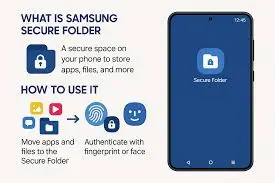
For many users, this feature resembles a personal vault within their phone. It lets you save private images, confidential information, and programs that you don’t want others to see. Whether it’s professional documents, personal discussions, or precious memories, Secure Folder provides piece of mind by keeping everything within sealed, protected, and only available to you.
What is Samsung Secure Folder?
Samsung Secure Folder is a built-in security feature found on many Samsung smartphones and tablets. It creates an encrypted zone within your smartphone in which you can keep apps, images, movies, documents, and other data separate from the rest of your phone.
This secure area is protected by modern security technologies such as Samsung Knox, guaranteeing that only you have access to the information contained therein. Users can unlock the folder with a password, a PIN, a pattern, or even biometrics like fingerprint or face recognition.
With Secure Folder, users can:
- Store private photos, videos, and documents safely
- Add apps inside the secure space
- Lock sensitive data with password or biometric security
- Keep work and personal data separated
- Hide important files from unauthorized access
Because everything inside the folder is encrypted, even if someone accesses your phone, they won’t be able to open the Secure Folder without authentication.
Why Use Samsung Secure Folder?
Many people choose Samsung Secure Folder because it adds an extra layer of privacy to their smartphone. Instead of worrying about someone accidentally opening personal files, users can simply move those files into the secure space where they remain hidden and protected.
Another major benefit is organisation. Some users keep work-related apps or confidential documents in the Secure Folder, allowing them to separate professional data from personal files. This makes it easier to manage different types of information while maintaining strong security.
Key Features of Samsung Secure Folder
Private Storage Space
One of the most important features of Samsung Secure Folder is its private and isolated storage environment. This space works separately from the rest of your phone, meaning anything you move into the Secure Folder stays protected and hidden from normal access. Photos, videos, documents, and other files stored here cannot be opened through regular gallery apps or file managers.
App Protection
Samsung Secure Folder also allows users to install apps directly inside the protected environment. This means you can run a completely separate version of certain applications within the Secure Folder. For example, you could have one social media account outside the folder and another private account inside it.
Strong Security with Samsung Knox
At the heart of Secure Folder is Samsung Knox, Samsung’s defence-grade security platform designed to protect devices from both hardware and software threats. Knox uses multiple layers of security to keep your data safe, including encryption, secure boot protection, and real-time monitoring.
Easy and Flexible Lock Options
Another advantage of Secure Folder is the variety of lock methods available. Users can choose the type of security that suits them best. The folder can be protected using a PIN, password, or pattern, providing traditional security options for easy access.
Hide or Show the Folder
Samsung Secure Folder also offers an extra privacy feature: the ability to hide the folder completely from the home screen and app drawer. When hidden, the folder does not appear like a normal app, making it difficult for others to even know it exists on your device.
How to Set Up Samsung Secure Folder
Setting up Samsung Secure Folder is simple:
- Open Settings on your Samsung device.
- Scroll down and tap Biometrics and Security.
- Select Secure Folder.
- Sign in with your Samsung account if required.
- Choose a lock method such as PIN, password, or fingerprint.
- Once set up, start adding files and apps to the folder.
After setup, you can easily move photos, documents, or apps into the secure space for protection.
How to Use Samsung Secure Folder
Once activated, using Secure Folder becomes very straightforward:
Adding Files
- Open Secure Folder.
- Tap Add Files.
- Select photos, videos, or documents you want to move into the secure space.
Adding Apps
- Open Secure Folder.
- Tap Add Apps.
- Install new apps or copy existing ones into the secure environment.
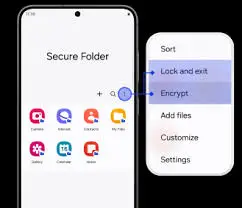
Locking the Folder
- Secure Folder can be manually locked anytime.
- You can also set it to lock automatically when the screen turns off.
Pros and Cons
| Pros | Cons |
|---|---|
| Strong data protection keeps your files safe | Available mainly on Samsung devices |
| Easy-to-use interface for quick setup | Requires Samsung account setup |
| Supports both apps and files securely | May use additional storage space |
| Biometric security options (fingerprint, face recognition) | Some users may forget the lock password |
| Powered by Samsung Knox, a defense-grade security system | Limited customization options |
FAQs
Q1: Is Samsung Secure Folder free?
Yes, it is a built-in feature available on many Samsung devices.
Q2: Can someone access my Secure Folder?
No, unless they know your password or have your biometric authentication.
Q3: Can I hide the Secure Folder?
Yes, you can hide the icon from your home screen for extra privacy.
Q4: Does Secure Folder protect photos and videos?
Yes, you can move private photos and videos into the folder for protection.
Q5: What happens if I forget the password?
You can reset access using your Samsung account if recovery options are enabled.
Conclusion
Samsung Secure Folder is one of the most useful privacy solutions for anyone who has a Samsung device. It creates a secure, encrypted environment in which you may keep sensitive information, private images, and crucial programmes without fear of unauthorised access. Everything in the folder is kept isolated from the rest of your phone, providing you peace of mind that your sensitive information is genuinely private.
Setting up Secure Folder is simple, and its security is powered by Samsung Knox, a defence-grade system that protects your data from unauthorised access. It allows you to manage who may see what by providing customisable lock choices such as PINs, passwords, patterns, and biometric verification. In an age where personal data is more valuable than ever, having this secure space on your phone keeps your vital information safe and under your control. You may also try Survivor.io APK.